Project
From Block Clock to Freedom Clock - The Metric That Finally Clicked
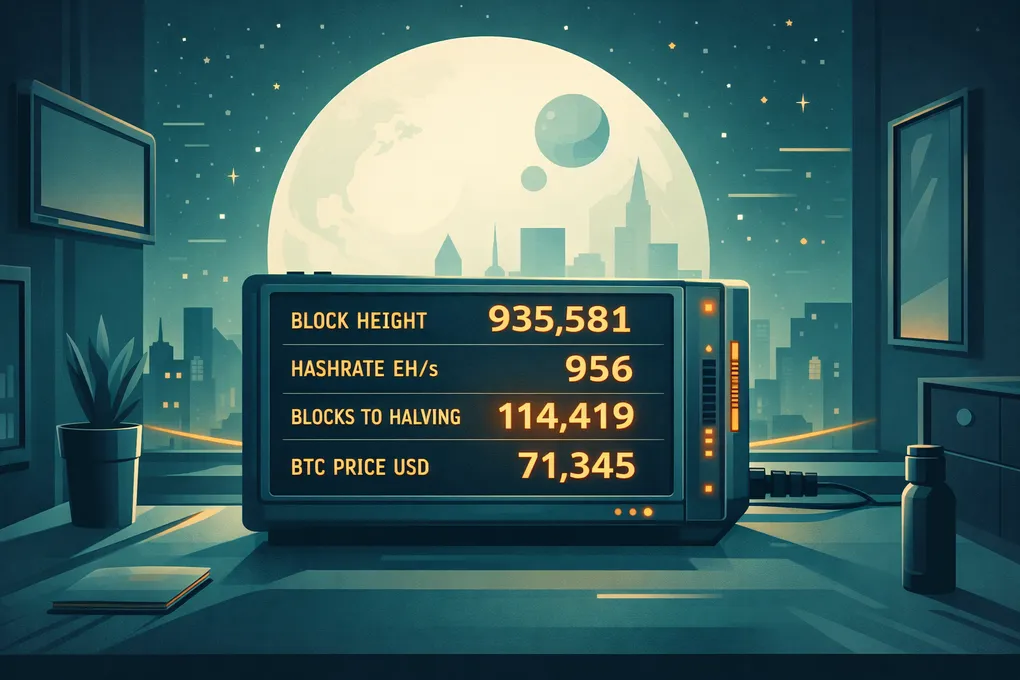
The moment the block clock stopped clicking for me
I loved the idea of a block clock long before I built one.
It has a certain Bitcoiner elegance to it. No apps. No exchange tabs. No endless refreshing. Just protocol time, quietly moving forward in the background.
So I did what builders usually do. I looked at what was already out there, compared options, and tried to picture which one I would actually want on my desk every day.
And honestly, I bounced off most of them.
Some looked beautiful but felt more like expensive decor than something I wanted to live with. Some were closed. Some were too large. And a few were priced high enough that I caught myself thinking: hang on, am I really about to pay this much for a tiny screen and a vibe?
So I did the predictable thing: I built my own.
How hard can it be, right?
I already had a Bitcoin node, and I was already generating Bitcoin-related signals on my local network. Publishing a few network stats and consuming them on a little display shouldn’t be a big deal.
Then I found exactly what I needed: a small e-ink board with Wi-Fi and the option to run on a battery.
The goal was simple: a calm, always-on Bitcoin clock I could put anywhere without constantly thinking about the battery.
That’s how the first version started.
I built it because I genuinely love the idea of protocol time.
Bitcoin clicks forward like a charm: block by block, roughly every ~10 minutes, indifferent to narratives.
A block clock makes that tangible.
You glance at it. No apps. No exchanges. No drama. Just: the network is alive, and it keeps moving.
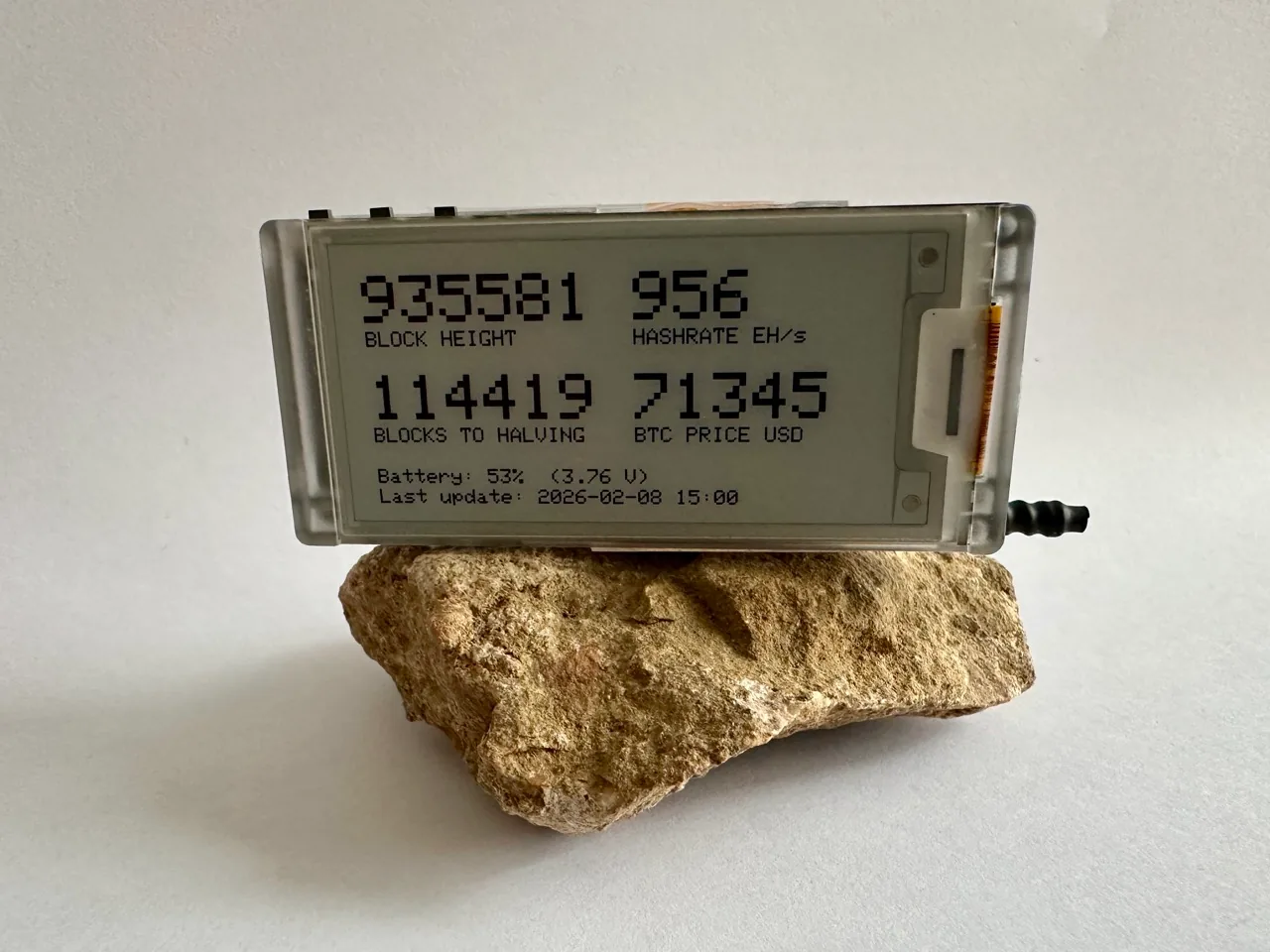
Custom-built Block Clock.
And then, after the novelty wore off, I ran into an annoying truth:
My brain doesn’t live in blocks. It lives in time on this earth.
When the screen said:
- “114,419 blocks to halving”
My brain didn’t feel grounded. It didn’t feel motivated. It felt… nothing.
It immediately translated it into:
Cool. So… a few years.
That number is correct. It just does not feel human.
Bitcoin time vs human time
Bitcoin time is objective.
- block height
- issuance schedule
- difficulty adjustment
- halving cycles
Human time is more emotional.
- mornings and evenings
- birthdays and school years
- projects and seasons
- the feeling of wasting your best hours in a job you don’t enjoy
So I flipped the question.
Instead of asking:
“What can Bitcoin tell me about the network?”
I started asking:
“What is Bitcoin buying me in human terms?”
And the answer wasn’t “blocks.”
The answer was time.
Time I don’t need to sell.
Time I can spend with my kids.
Time I can spend building things I actually care about.
Time I can stop trading my life for a schedule I didn’t choose.
That was the moment the block clock transformed into something else.
The Freedom Clock
So I started building a second version.
Not a block clock.
A Freedom Clock.
Same physical idea (calm, always-on, no distractions).
Same builder spirit (open, hackable, yours).
But a different purpose:
Not “Bitcoin ticks.”
“How much freedom have I bought?”
If you landed here and just want the current project page, calculator, and build guide, start here:
That site is the simple front door. This article is the longer story behind why I built it.
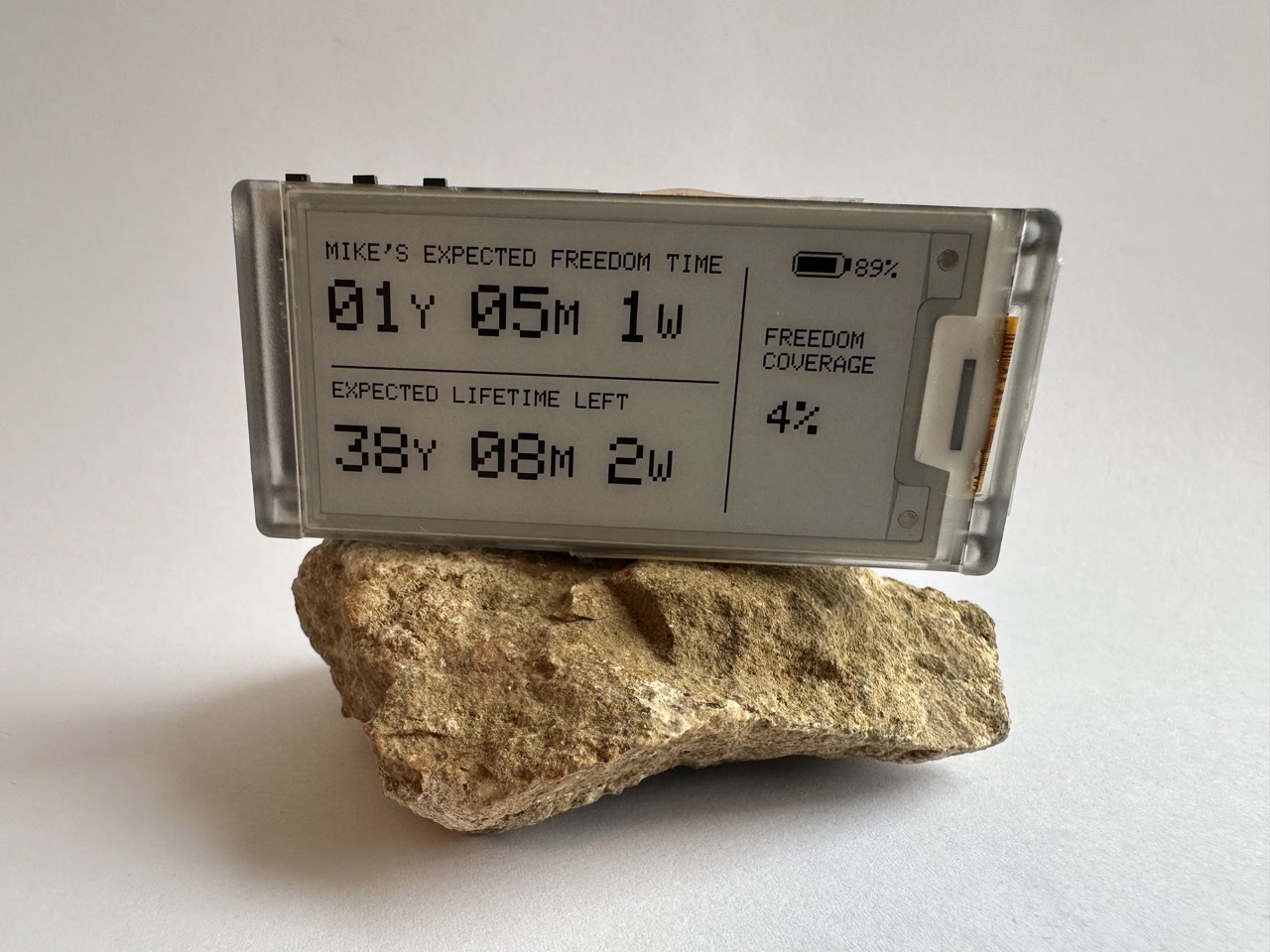
The main screen: expected freedom time, expected lifetime left, and freedom coverage.
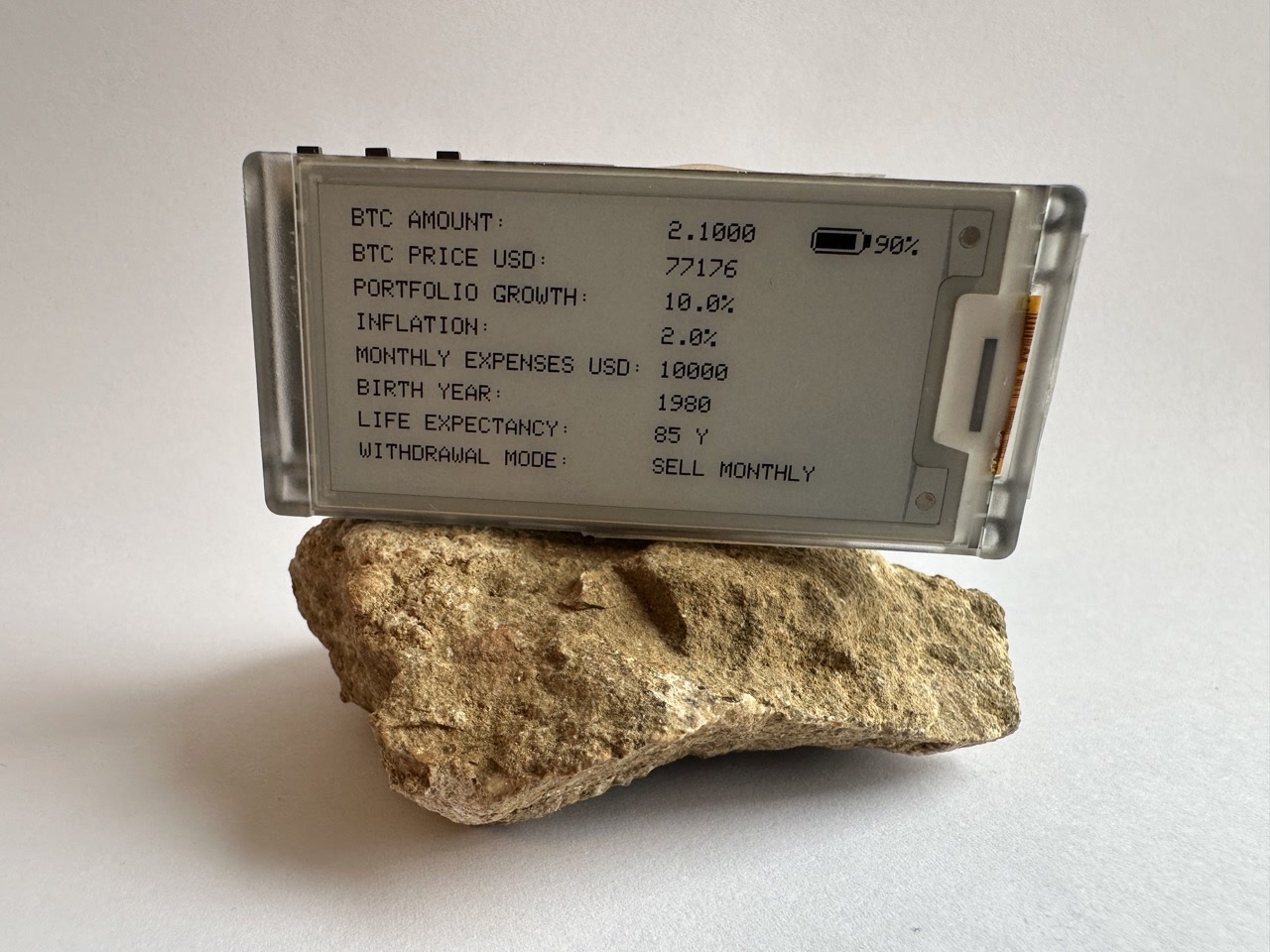
An additional screen shows the assumptions behind the number.
What it shows now
The Freedom Clock is still built around three connected signals:
- Expected freedom time: how long the portfolio could support the chosen lifestyle.
- Expected lifetime left: a quiet reminder that time itself is limited.
- Freedom coverage: what percentage of the remaining expected lifetime is covered by the portfolio.
Not in blocks. Not only in fiat. In human units:
- years
- months
- weeks
This is basically the question behind FIRE, stripped down to the core:
If I stopped earning tomorrow, how long could I keep living the life I want?
But the second number changed the product for me.
The device is no longer only about money. It is also a small memento mori on my desk. It reminds me that even if the portfolio keeps growing, the other clock keeps moving too. The goal is not to stare at the number and feel clever. The goal is to ask whether I am using my time well.
The freedom number depends on assumptions: monthly expenses, inflation, portfolio growth, BTC price, life expectancy, and the withdrawal model. That is why the device now has supporting screens. The main screen is emotional. The supporting screens create trust.
The current version has one main screen and three additional supporting screens:
- Main screen: expected freedom time, expected lifetime left, and freedom coverage.
- Freedom change screen: freedom gained or lost over recent periods.
- Wealth screen: current wealth and wealth change over recent periods.
- Settings and inputs screen: the assumptions behind the calculation, plus device and firmware information.
It turns Bitcoin from an abstract asset into a compass.
What changed since the first public version
The early version already answered the main question. The newer version makes the device much more usable as a real object on a desk.
It now supports:
- Motivational quote of the day: an optional quote screen that turns the device into a calmer reminder between number updates.
- Software updates directly from GitHub: the device can check releases and install new firmware without reflashing from scratch.
- PIN-protected setup: setup can be protected so the configuration is not casually exposed.
- Various time formats: for example years/months/weeks or weeks-only display.
- Larger 2.9-inch screen support: the same project now supports the Heltec Vision Master E290, not only the smaller E213.
- Wealth change over time: for example 7-day and 30-day movement.
- Freedom change over time: how much freedom was gained or lost over recent periods.
That last part matters a lot. The device is no longer only asking:
How much freedom do I have?
It can also ask:
Am I moving in the right direction?
That is more useful than a price chart. A price chart makes you think like a trader. A freedom-change view makes you think like a person designing a life.
Why this is more motivational than network stats
Network stats are true. They’re important. They’re also… emotionally neutral for most people.
Freedom time is different.
It makes you ask:
- “Do I want to trade my next year for this job?”
- “Is this project worth my time?”
- “What would I do if I had 6 months more freedom?”
- “Am I building the life I want or just surviving until Friday?”
- “If I really have this much time left, what am I postponing for no good reason?”
That is why this device finally clicked for me.
I also showed the newer version to my wife, who is not a Bitcoiner. That became a useful test. She understood the core idea immediately: savings converted into time, and life expectancy shown as a second clock. The one label that confused her was “lifetime covered.” She read it as “how much of my life I have already lived,” not “how much of my remaining life is covered by savings.”
That was a good reminder: if the metric needs explaining, the label is wrong. So I changed the wording toward freedom coverage.
What stayed the same (builder principles)
A Freedom Clock is still a Bitcoin-native project in the ways that matter:
- calm by design (no constant refresh, no alerts)
- local-first mindset (avoid leaking personal data to third parties where possible)
- simple beats flashy (function first, polish later)
- you control the signal (you decide what matters)
In other words: it’s still not a consumer gadget. It’s a habit.
A reminder on your desk that your attention is valuable. That your time is finite. That you’re building toward something.
The main screen is intentionally simple. It should be readable in one glance. The supporting screens exist so the main screen can stay calm without hiding the assumptions.
What I learned along the way
1) The hardest part isn’t the hardware
It’s choosing a metric that changes your behavior.
A dashboard can be technically perfect and still be useless.
If the screen went dark tomorrow, what would you actually miss?
That question is brutal. And helpful.
2) “Real-time” is usually a trap
Frequent updates drain battery and steal attention.
For a calm desk device, slow cadence wins.
3) Assumptions matter more than precision
The first versions were more about getting the metric onto the screen.
The newer version made something obvious: if the number is emotional, the assumptions need to be visible. Otherwise it feels like magic.
So an additional screen shows the inputs: BTC amount, BTC price, portfolio growth, inflation, monthly expenses, birth year, life expectancy, withdrawal mode, and firmware information.
That is not there to make the device feel complicated. It is there to make the main screen believable.
4) Price still has a role (but it’s not the point)
I still include price, not as a signal to act, but as a translator people naturally use today.
The Freedom Clock shifts the focus: price becomes secondary to freedom time and choice.
5) A physical object needs more than software
The code matters, but the object matters too.
A bare board on a desk feels like a prototype. A small case, a proper stand, and a clear setup flow make it feel like something another person could actually live with.
That is the next frontier for this project: not only making the firmware better, but making the whole build easier to understand, easier to assemble, and easier to make your own.
Next steps: where this goes from here
The next step is probably not more data. It is making the object feel complete.
I want to work on:
- a 3D-printed case that makes the device feel like a finished desk object, not a dev board
- a better stand or enclosure so it can live naturally on a desk, shelf, or bedside table
- iterating on the name and seeing how people react to “Freedom Clock”
- showing it to more people outside the Bitcoin bubble
- making it useful for others, not only for my own setup
- helping others build their own Freedom Clock and make it theirs
That last point is important.
The goal is not to turn this into another closed gadget. The goal is to create a simple object and a clear guide that helps someone else ask their own version of the question:
How much of my life have I already bought back?
Bitcoin isn’t just a network. It’s a tool for reclaiming your time.
Freedom has more than one meaning
“Freedom” is not just one thing. People chase different versions of it:
- Time freedom: you control your schedule and how you spend your days.
- Location freedom: you can live/work from where you prefer (digital nomads are the classic example).
- Financial freedom: you can cover your life and spend on what matters without constant money stress.
- Any combination: most people want a mix of these, not just one.
A deeper kind of freedom: the courage to be disliked
In The Courage to Be Disliked, freedom is framed differently: it starts when you allow yourself to be disliked. Not because you want conflict, but because living honestly means you won’t satisfy everyone’s expectations.
The moment you stop optimizing for approval and start listening to what you truly want from life, you become harder to control, and you begin to feel genuinely free.
Get the code, parts list, and build guide
The GitHub repository is not only a code dump. It is the starting point for building your own Freedom Clock.
It contains the software, setup notes, supported hardware, build instructions, firmware releases, and the practical details needed to get started.
Start here:
- Project website, calculator, and simple overview: https://freedomclock.io/
- Freedom Clock build guide, parts list, firmware releases, and source code: https://github.com/mr21free/freedom-clock
- Original block clock project: https://github.com/mr21free/blockclock
If you want the shortest path, start with the website.
If you want to build, modify, or understand the firmware, start with GitHub.
The idea is simple: order the parts, upload the software, enter your assumptions, and then make the device yours.
What you can do
Beginner
- Don’t start with “all the metrics.”
- Start with one question you want to answer every day.
- Build a calm display for that question (hardware or software).
- Keep it visible for 30 days.
Advanced
- Treat privacy as a feature.
- Avoid turning personal data into something visible to strangers, guests, or cameras.
- Prefer ranges or progress indicators over exact numbers.
- Make setup understandable for someone who is not you.
- Design the object around the behavior you want, not the data you happen to have.
Bitcoin Heating System - Product Lessons from Zero to Production
I had never taken a hardware product to customers before. This is what happened when we tried to turn a Bitcoin Heating System into a real product, and what it taught me about product strategy, leadership, risk, and learning fast.
Why I Built OpenFirst - An Inheritance Plan My Family Can Actually Open
I wrote a private, offline inheritance plan in plain text files. It was secure, it was durable, and nobody enjoyed using it — including me. This is the story of how that folder of files became OpenFirst, and what building a product for exactly one user taught me about building for everyone.